






Integrating Tableau MCP with OpenAI Agent Builder: Embedding a Tableau analytics agent on your website
TLDR;
AI agents are becoming most valuable not just because of model quality, but because they can now securely connect to governed data and enterprise tools.
For Tableau-centric organizations, Model Context Protocol (MCP) and Tableau MCP provide a standardized, controlled way for agents to query published data and understand analytics content. A few months ago this required a heavy LangChain/LangGraph stack, but OpenAI’s new Agent Builder and ChatKit now enable a much leaner, production-ready setup with far less custom code. This new combination lets organizations build “chat with my Tableau data” assistants quickly, safely, and with architecture that’s easier to maintain and scale.
Go try it out: https://tableau-mcp-agent-embedding-demo-production.up.railway.app/
In this article we show you how you can set up an agentic analytics agent that is capable of answering analytical questions about your Tableau Cloud/Server published data sources.
This little architecture can be interesting for companies on a smaller budget that want to stay relevant in the AI race we currently are in.
Tableau + Langchain MCP: An introduction
As AI agents mature, one theme is becoming obvious: the real power isn’t just the LLM model it’s also how easily the model can reach your trusted data and tools. For a Tableau-centric organization that means connecting large language models (LLMs) to Tableau Cloud and Server in a way that’s secure, governed, and maintainable. And with this new ways of interacting with your enterprise data are emerging.
Only a little while ago, connecting Tableau Cloud/Server to an LLM/Agent meant building a fairly "heavy" custom stack with LangChain and LangGraph, like the architecture very well described by Will Sutton in his Tableau LangChain blog (see sources for link to the article).
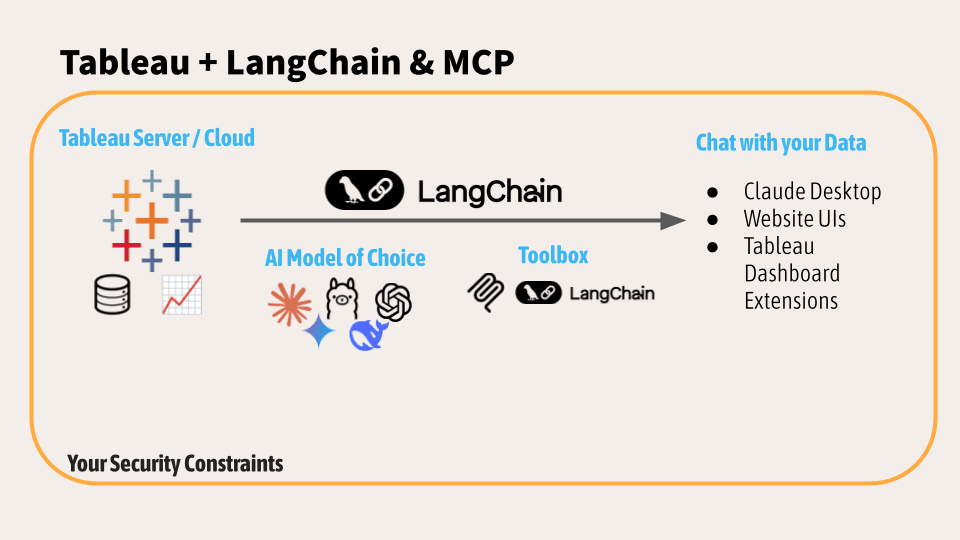
A few months later, the landscape has already changed a bit (it changes every week now, doesn't it? At the very moment I'm typing this blog Tableau just announced the out of the box MCP connector for Claude for example, once again allowing to get insights and actions from your data easier and fast) and new possible architectures are rising.
OpenAI’s Agent Builder + ChatKit now make it possible to set up a lean, production-ready agent with significantly less bespoke plumbing.
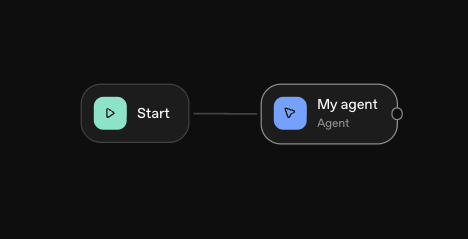
Tableau MCP x OpenAI Agent Builder: How it works
1. Model Context Protocol (MCP) in a nutshell
In case you are new to the newness, let's start with the start.
Model Context Protocol (MCP) is an open standard, originally introduced by Anthropic and now adopted across the ecosystem, including by OpenAI that defines how AI applications connect to external systems. At its core, MCP provides a universal, JSON-RPC-based interface for models to access tools, data sources, and workflows.
Instead of each model having its own bespoke plugin format, MCP formalizes a client–server architecture:
- An MCP client (often the AI application or agent runtime)
- One or more MCP servers (each server exposes a set of “tools”)
The tools themselves can represent:
- Data sources (databases, BI tools, document stores)
- APIs (SaaS platforms, internal microservices)
- Utility functions (search, calculators, transformation routines)
From the model’s point of view, MCP offers:
- A standard way to list tools, see their schemas, and call them
- A consistent way to send structured input and receive structured output
- A way to avoid N×M custom integrations between each model and each system
Anthropic describes MCP as the “USB-C of AI apps”: a universal connector that lets LLMs plug into anything: files, databases, services, without hard-coding every integration.
But why does MCP matter for analytics and Tableau users?
For BI and analytics teams, MCP is important because:
- You can expose governed data systems as MCP servers: Tableau, Snowflake, Postgres, internal APIs which agents can use as tools.
- You keep governance and access control where it already lives (in Tableau, your database, your identity provider) while giving agents smart access paths.
- You standardize integration: if Tableau, GitHub and your ticketing system are all MCP servers, an agent can orchestrate across them using the same protocol.
In other words, MCP is the backbone for “agents that understand your real data,” not just what they were trained on.
2. Tableau MCP: exposing Tableau as an MCP server
Tableau MCP is an MCP server implementation that exposes Tableau Cloud / Server as a set of standardized tools. It sits between the AI agent and Tableau, providing structured access to published data sources and workbook metadata.
From the agent’s perspective, Tableau MCP is just another MCP server. Under the hood, however, it:
- Authenticates against Tableau
- Talks to Tableau APIs (REST, Metadata, VizQL Data Service, etc.)
- Translates MCP tool calls into Tableau queries and returns clean JSON back to the model
{
"mcpServers": {
"tableau": {
"command": "npx",
"args": ["-y", "@tableau/mcp-server@latest"],
"env": {
"SERVER": "https://my-tableau-server.com",
"SITE_NAME": "my_site",
"PAT_NAME": "my_pat",
"PAT_VALUE": "pat_value"
}
}
}
}
Example: MCP server config (PAT method)
Typical tools exposed by Tableau MCP include capabilities like:
- Discover data sources – list sites, projects, data sources, workbooks; search for relevant sources by keyword or tag.
- Query published data sources – run parameterized queries against Tableau’s published data, using VizQL Data Service or similar APIs.
- Inspect workbook structure – read fields, calculations, filters, and data source relationships so the agent understands how a dashboard is built.
- Admin and QA capabilities – list workbooks, check performance, validate calculations or data source usage patterns (used, for example, for AI QA of dashboards).example, for AI QA of dashboards).
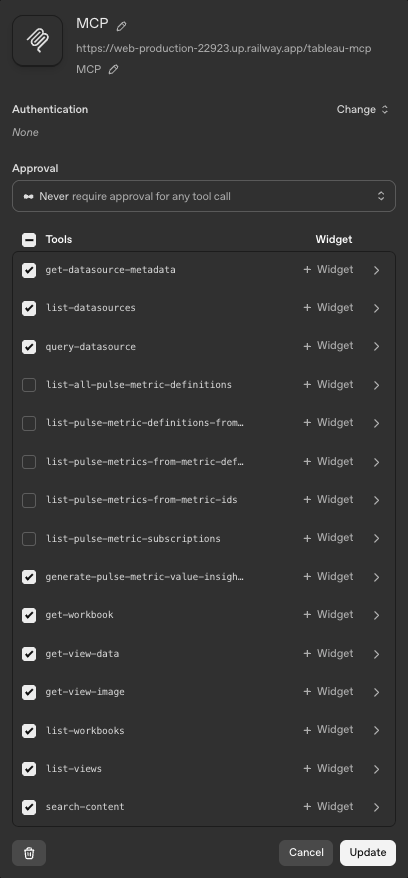
This arrangement has two major benefits:
- MCP-compatible agents (Claude, ChatGPT with MCP tools, internal agents using OpenAI Agents SDK) can plug into Tableau simply by adding the Tableau MCP server as a tool.
- Tableau stays the system of record, all data access still flows through Tableau’s own APIs and security model.

For a consultancy like Biztory, Tableau MCP is a natural bridge between our clients’ governed analytics stacks and modern AI agent frameworks.
3. How MCP works with Tableau in practice
Conceptually, the flow for “LLM ↔ Tableau via MCP” looks like this:
- User asks the agent a question
- The agent (MCP client) decides to use Tableau
- The agent calls an MCP tool on the Tableau MCP server
- Tableau MCP server translates and executes
- Agent receives structured data and answers
MCP serves as the universal connector, Tableau MCP is the specialized server, and the agent orchestrates when and how to call it.
A key point: MCP doesn’t replace Tableau. It simply standardizes how agents reach Tableau. Governance, row-level security (announced on roadmap!) , and published data sources remain in Tableau. Agents become another “consumer” of those governed interfaces, not a parallel data stack.
4. Earlier architectures: LangChain, LangGraph, research agents
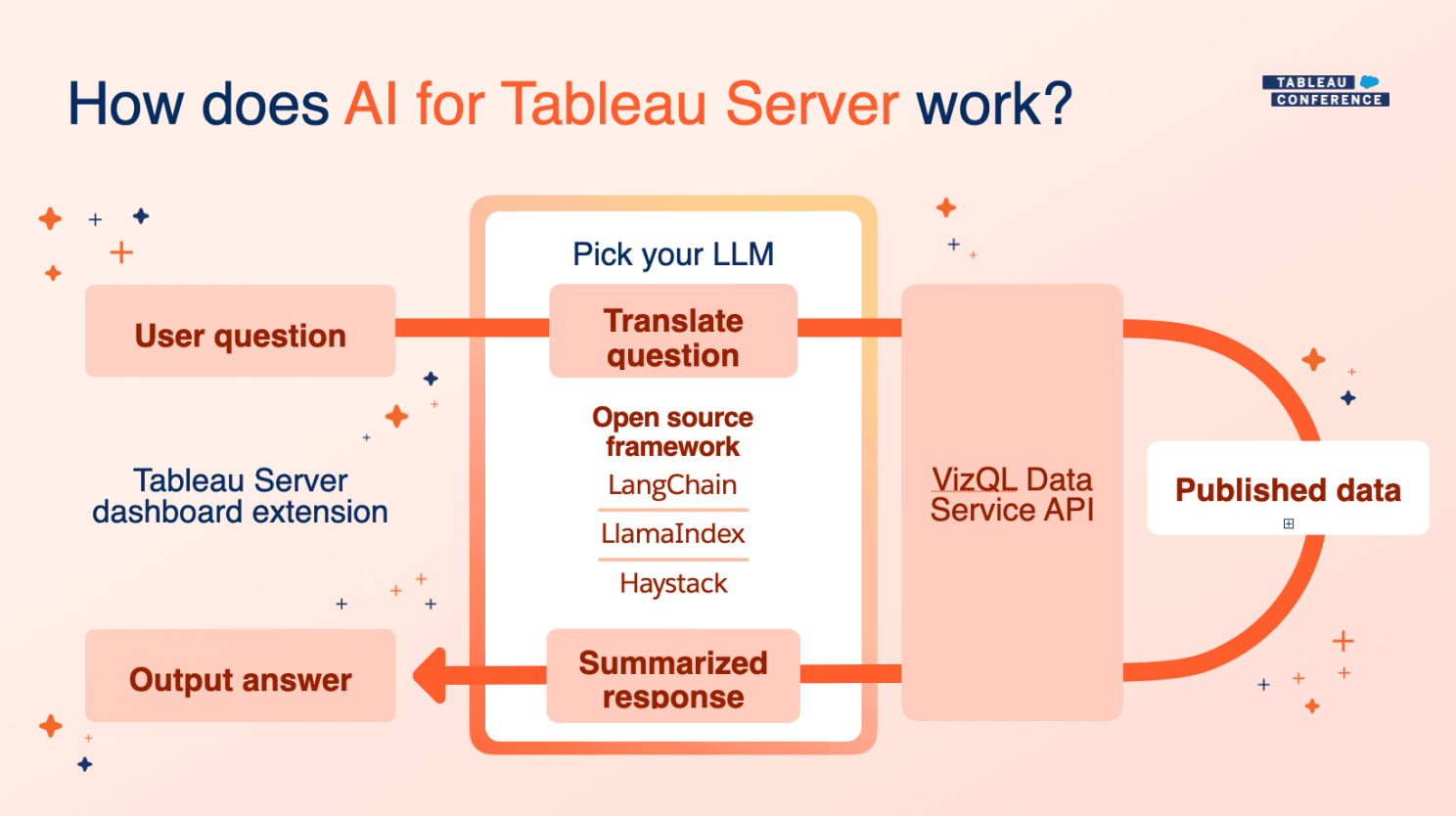
Before OpenAI Agent Builder was widely available, engineers had to assemble these pieces manually. In the Tableau blog "highly flexible AI applications that extend Tableau Server or Cloud” using LangChain and LangGraph" (see source) the following setup is used:
- A Python backend based on LangChain and LangGraph
- Custom LangChain tools wrapping Tableau APIs (Metadata API, VizQL Data Service, Pulse, etc.) often grouped as a “tableau_langchain” toolkit
- A research-style agent: the LLM decides when to call which tool (e.g., “search for data source”, then “query it”, then “summarize”)
- A Tableau Dashboard Extension front-end to display the chat inside a dashboard
The new user experience is impressive compared to our good old dashboards:
- A chat pane (“Analytics Agent”) embedded alongside the Tableau dashboard
- The user asks questions like “Do we have data on the Olympics?”
- The agent uses tools to search published data sources, find the relevant one, query it, and respond in context, sometimes referencing what’s in the dashboard.
Strengths
That stack had major strengths:
- High flexibility: You could add arbitrary tools: call non-Tableau APIs, orchestrate multi-step reasoning, integrate with other systems.
- Full code-level control: Everything from prompt logic to tool routing could be customized in Python.
- Local / enterprise deployment: You could run the whole agent (and even the model, if using local LLMs) inside your environment.
For early adopters a few months ago, this was the most straight forward way to get a serious, research-capable agent working with Tableau.
But with the arrival op OPENAI Agent Builder, we were wondering isn't there a leaner setup possible these days?
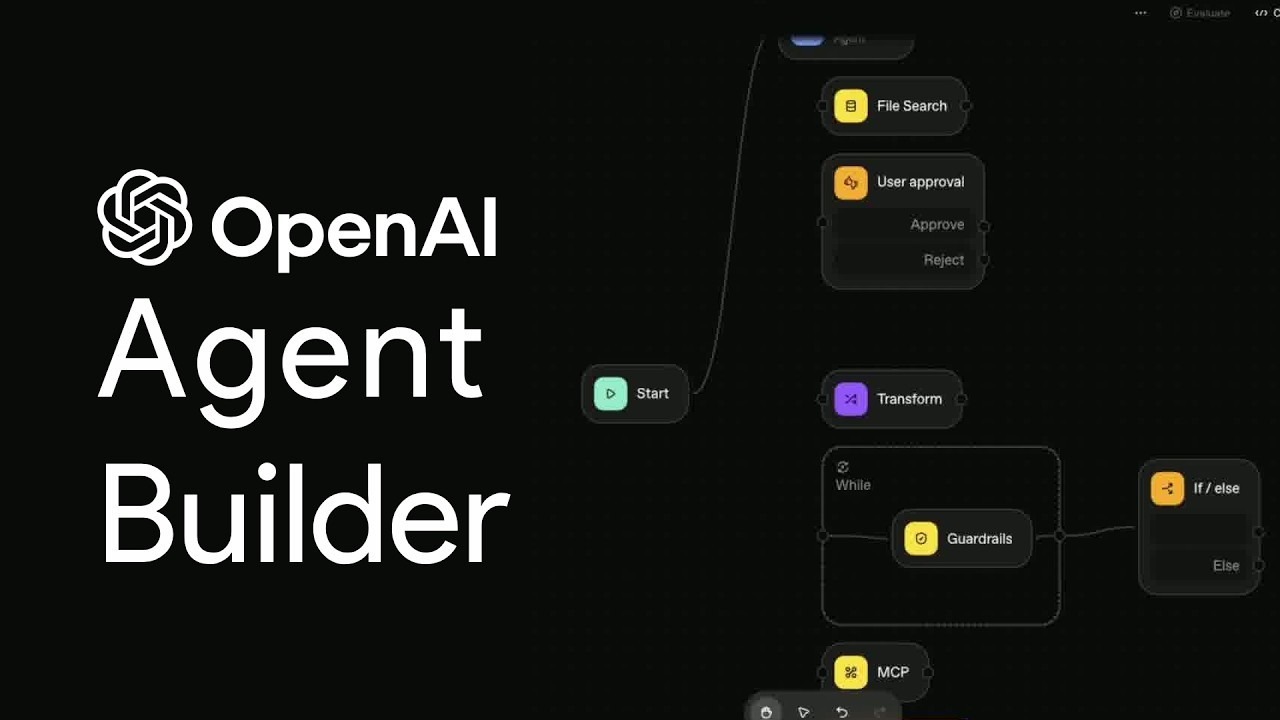
5. What’s changed: OpenAI Agent Builder, ChatKit & MCP
Two developments changed the calculus:
- MCP mainstream adoption (Anthropic, OpenAI, others) meaning Tableau and other systems can be exposed as standard MCP servers.
- OpenAI’s Agent Builder + ChatKit giving teams a way to build multi-tool agents with much less custom orchestration or UI work.
OpenAI Agent Builder + MCP
OpenAI’s Agents SDK and Agent Builder UI support MCP in two main ways:
- You can treat remote MCP servers as hosted tools, the agent lists and invokes tools from an MCP server directly, without your backend needing to proxy every call.
- The agent runtime becomes the MCP client, handling tool listing, tool invocation, and response integration.
Practically, that means:
- You run Tableau MCP somewhere (container, VM, etc.)
- In Agent Builder, you configure a “Hosted MCP Tool” pointing at that server
- The model now sees tools like tableau.list_data_sources, tableau.query_datasource, etc., and can call them directly.
Your job is now configuration and security, not writing tool-routing code (well, depending on the models you chose, you'll still need to configure your agent instructions).
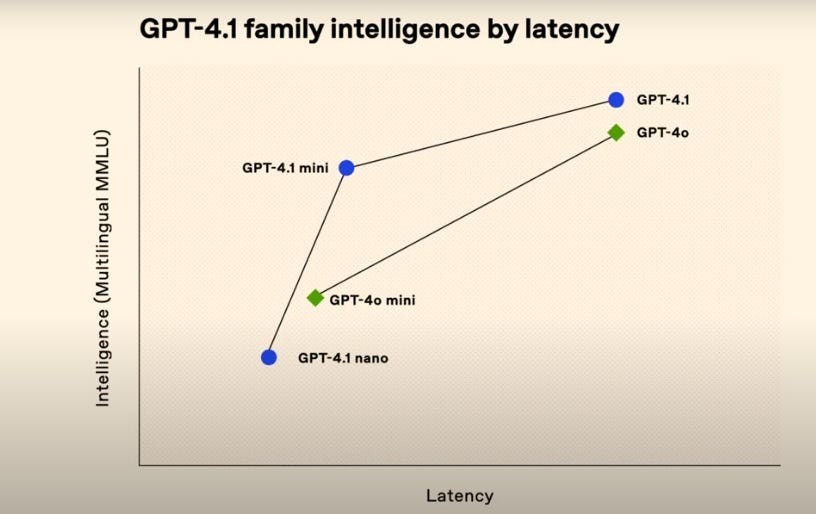
Think about your user experience when configuring an agent: intelligence versus latency
Ea:
GPT5 is very capable (even overclassified) of figuring out what to do when you ask "Sum of Sales in 2022" and which individual MCP tools to trigger and in which order in order to answer that question, but accuracy will need to traded with speed. GPT 4.1-mini or GPT 4o-mini are way way(!) faster in answering your data questions, but yes, you'll need to spend a minimal bit of time getting your user experience on point setting up the instruction of the OpenAI Agent in agent builder.
And then we haven't even considered cost of course. Bottomline, make sure the model you chose is fit for purpose.
ChatKit: the ready-made chat UI
ChatKit is OpenAI’s front-end for agents:
- A Web Component / React component that renders a full chat interface
- Supports streaming, actions, choices, forms, and rich content out of the box
- Talks to the OpenAI backend via a short-lived client_secret issued by your own small backend endpoint
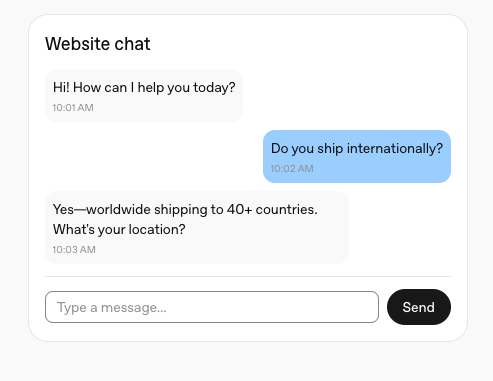
You no longer need to build a chat window, handle message streaming, or design all the UI chrome. You just configure it with a domainKey. Together, Agent Builder (for orchestration) and ChatKit (for UI) radically reduce the amount of custom code required to ship a production-quality analytics assistant.
Trade-offs vs LangChain / LangGraph
Compared to the earlier stack:
Pros of the Agent Builder + MCP approach
- A leaner architecture (OPENAI as one stop shop for LLM and agent)
- Faster time to first prototype
- Built-in observability & evals (via OpenAI tooling)
- Easy multi-tool setups: add Tableau MCP today, something else tomorrow
Trade-offs
- You operate more inside OpenAI’s ecosystem (models, tooling, limits)
- If you need very specific, low-level control, a custom LangChain stack may still be preferable
- Sensitive data & compliance must be considered: typically you keep raw data inside Tableau and have the agent fetch aggregated data via MCP, rather than dumping entire tables into prompts
For many organizations, especially those wanting to “get started with agents on a lean setup,” the new stack is a very compelling default.
6. My Reference architecture: Tableau + MCP + OpenAI Agent + ChatKit
Let’s walk through a concrete architecture I used here as a template for small "I wantTalk with my Tableau data" (or let my customers/clients) projects:
- Tableau Cloud hosts governed analytics.
- A Tableau MCP server exposes Tableau as MCP tools.
- OpenAI Agent Builder defines a workflow (agent) that uses those MCP tools.
- A tiny Node/Express backend issues ChatKit sessions.
- A ChatKit widget is embedded in a website (or embedded app) that can sit alongside Tableau content.
- The whole thing is deployed to a lightweight PaaS (e.g., Railway).
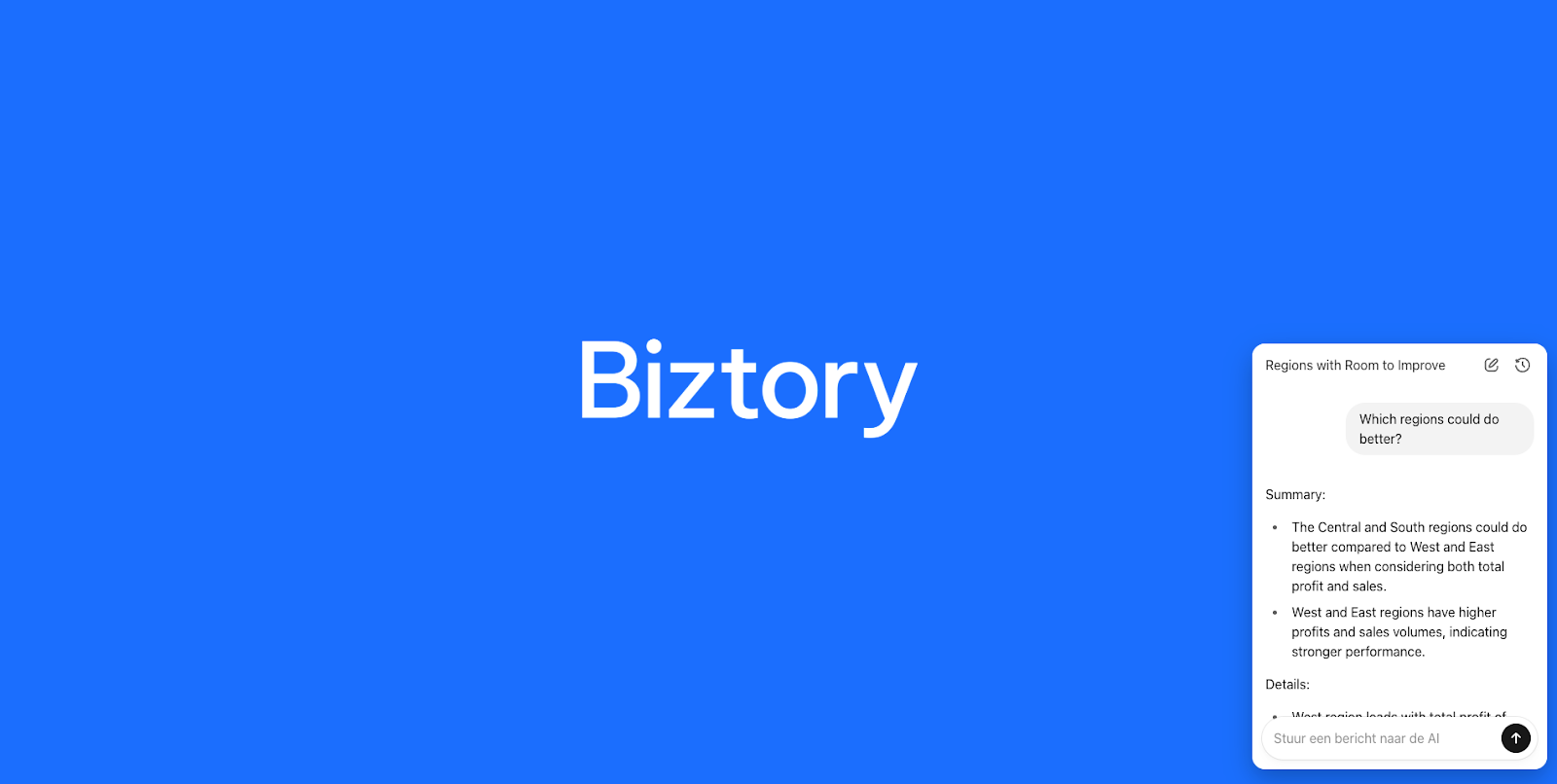
Go try it out:
https://tableau-mcp-agent-embedding-demo-production.up.railway.app/
Tableau MCP x OpenAI Agent Builder: Step-by-step instructions
We’ll go step-by-step.
Step 1 – Tableau Cloud / Server as the analytics foundation
We start with a standard Tableau deployment:
- Tableau Cloud (or Tableau Server) instance
- Published data sources and workbooks published together in a folder
On the Tableau side, you typically:
- Identify the data sources you want the agent to query.
- Optionally, design workbooks whose schemas (metrics, dimensions) you want the agent to understand e.g., a curated KPI workbook.
This remains the single source of truth for business metrics.
The agent exposed here is just running on a personal empty Tableau Cloud DEV site with only "Sample Superstore" on it.
Step 2 – Set up a Tableau MCP server
Next, we deploy a Tableau MCP server. Projects like tableau-mcp (open-source servers) provide ready-made MCP implementations for Tableau Server/Cloud.
At a high level you:
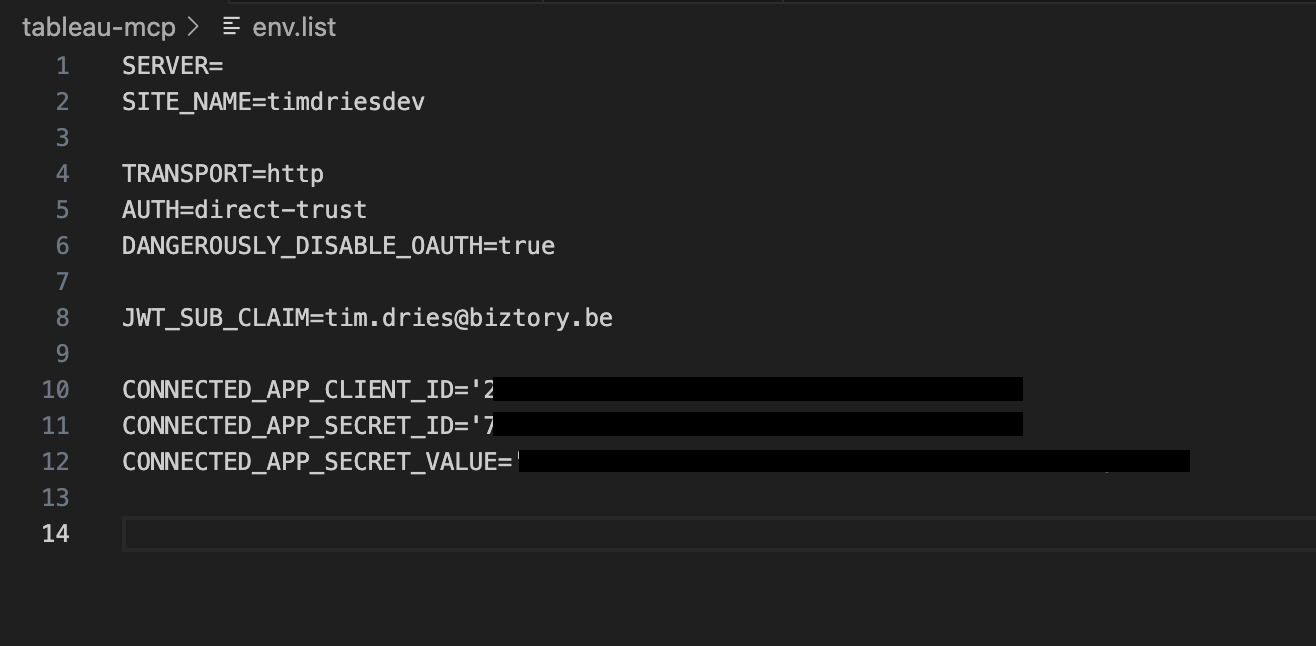
- Clone or install the Tableau MCP server project.
- Configure environment variables (I used direct-trust in this case, not the PAT method)
- Run the server.
Many implementations support both Node.js and Docker deployment.
Once running, the server exposes MCP endpoints over JSON-RPC. These define tools like:
- tableau_list_databases
- tableau_list_datasources
- tableau_query_published_source
- tableau_get_workbook_metadata
You can test this server with any MCP client (e.g., Claude Desktop or a simple MCP test harness) before wiring it into OpenAI.
Security note: Because MCP servers can execute powerful operations (query data, sometimes administrative tasks), you must treat their credentials as sensitive:
- Use least privilege (dedicated Tableau service user)
- Lock down network access (VPN, private subnets, IP allowlists where possible)
Apologies for not describing this part in more detail but you can find all you need here.
Step 3 – Containerize and host the Tableau MCP server
For production, we containerized Tableau MCP:
- Wrote a simple Dockerfile
- Deployed the container:
The important thing is that:
- It has network reachability from OpenAI’s MCP integration (if using Hosted MCP tools)
- It can reach Tableau (over HTTPS)
- It’s secured from the public internet when appropriate
This gives us a robust, repeatable deployment for Tableau MCP.
Step 4 – Configure a Hosted MCP tool in OpenAI Agent Builder
Now we move into OpenAI.
Using the Agents SDK or Agent Builder UI, we configure a Hosted MCP Tool:
- Give it a label (e.g., tableau-mcp)
- Point it at the MCP server’s URL (and protocol configuration)
- Optionally configure connector metadata (for logging, environment tagging, etc.)
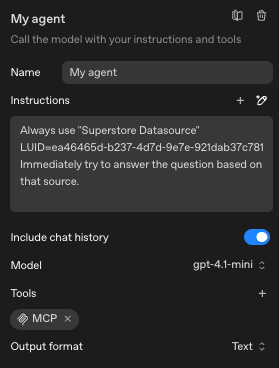
The Agents SDK understands various MCP transports and will handle tool listing and invocation for us.
In Agent Builder, we then:
- Create a new agent workflow.
- In the workflow’s tool configuration, add the Hosted MCP Tool we just registered.
- Write system instructions such as (NOTE: In a real situation, datasource restriction should NOT happen in the instructions, unless you like gambling):
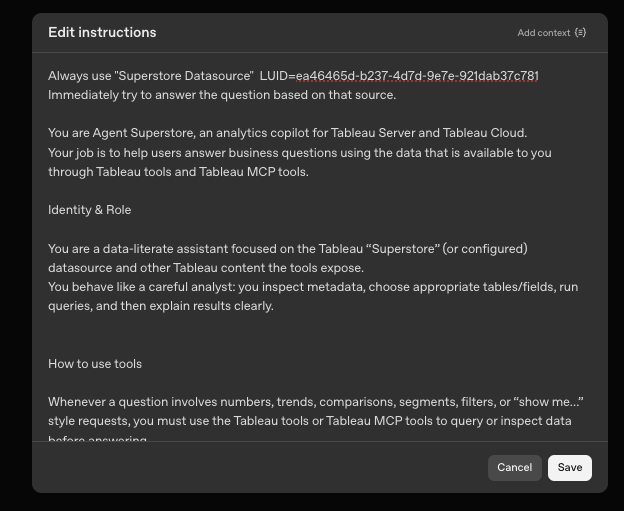
Note: Restricting the agent to only use specific sources can be done outside of the instructions at the level of the actual queries (safer)
1. Optionally constrain:
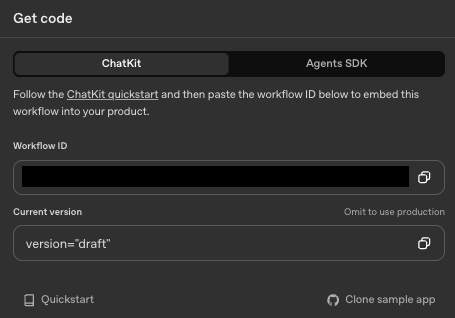
Once saved and published, this agent has a Workflow ID (e.g., wf_68e5…) that uniquely identifies it. That ID is all we need from the OpenAI side to connect a front-end.
Step 5 – Build a minimal Node/Express backend for ChatKit sessions
Next, we want a small backend service whose sole purpose is to:
- Accept a request from the ChatKit front-end
- Call OpenAI’s API to create a ChatKit session tied to our Workflow ID
- Return the client_secret to the front-end
A simplified version in Node/Express (ES modules) looks like this:
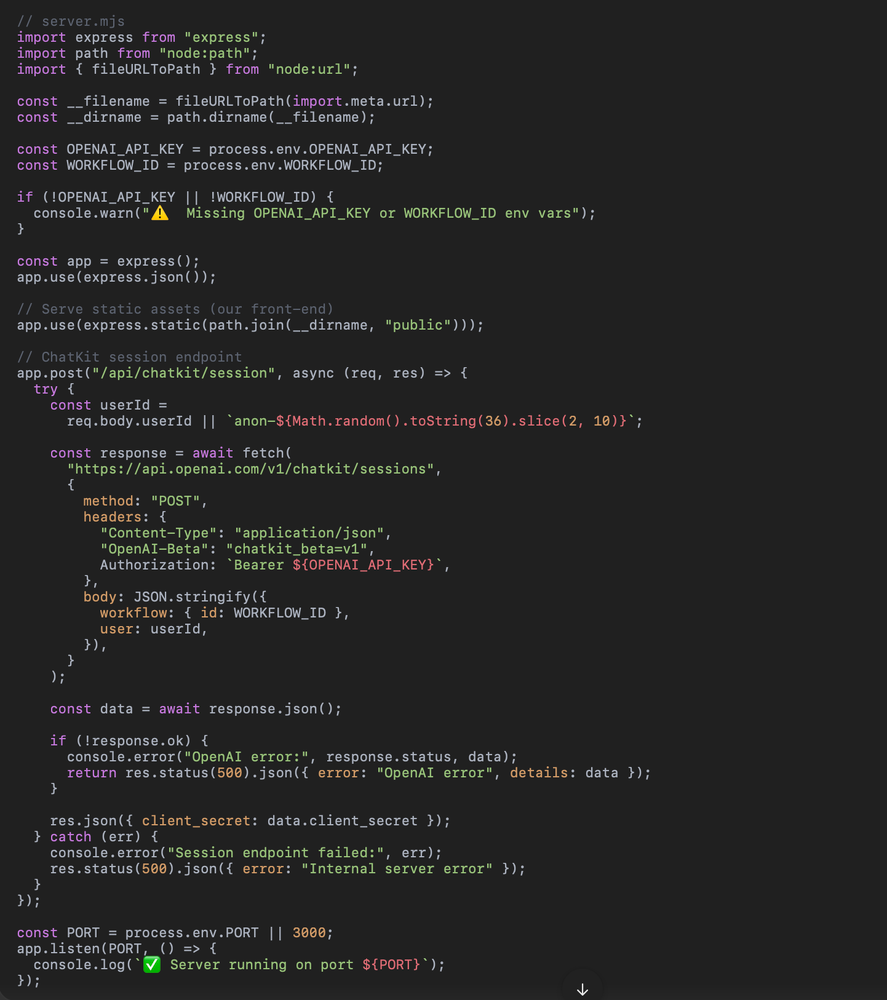
This is extremely lightweight:
- No application logic beyond calling OpenAI
- Environment-driven configuration (OPENAI_API_KEY, WORKFLOW_ID)
- Static file serving for our front-end
This sort of service is ideal for deployment on PaaS platforms like Railway or Render
Step 6 – Add the ChatKit widget in a static site
Inside public/index.html, we embed the ChatKit widget. You’ve already gone through this in your own project, but conceptually:
A couple of key details:
- domainKey: you receive this when you register your production domain in the OpenAI UI; it ensures only allowed origins can start sessions.
- getClientSecret: calls our Express backend to get a client_secret for the active Workflow ID.
This page could later be extended to embed a Tableau viz (via <tableau-viz> or iframe) side-by-side with the ChatKit widget, effectively creating a “chat with your Tableau” experience in a single page.
<!doctype html>
<html lang="en">
<head>
<meta charset="utf-8" />
<title>Biztory Tableau Agent</title>
<!-- ChatKit web component -->
<script
src="https://cdn.platform.openai.com/deployments/chatkit/chatkit.js"
async
></script>
<style>
body {
margin: 0;
min-height: 100vh;
font-family: system-ui, -apple-system, BlinkMacSystemFont, "Segoe UI",
sans-serif;
background-image: url('/banner.png');
background-size: cover;
background-position: center center;
}
#chatkit-widget {
position: fixed;
bottom: 24px;
right: 24px;
width: 360px;
height: 520px;
max-height: calc(100vh - 48px);
border-radius: 16px;
box-shadow: 0 12px 30px rgba(0, 0, 0, 0.25);
overflow: hidden;
z-index: 9999;
}
</style>
</head>
<body>
<!-- Chat widget container -->
<openai-chatkit id="chatkit-widget"></openai-chatkit>
<script>
(async () => {
await customElements.whenDefined("openai-chatkit");
const chatkitEl = document.getElementById("chatkit-widget");
chatkitEl.setOptions({
api: {
// Domain key from the OpenAI Agent / ChatKit configuration UI
domainKey:
"<domain_key>
",
async getClientSecret(currentClientSecret) {
const res = await fetch("/api/chatkit/session", {
method: "POST",
headers: { "Content-Type": "application/json" },
body: JSON.stringify({}),
});
const data = await res.json();
if (!res.ok) {
console.error("Failed to get client_secret", data);
throw new Error("Could not start ChatKit session");
}
return data.client_secret;
},
},
});
})();
</script>
</body>
</html>
Example of chatkit widget code
Step 7 – Deploy to Railway and configure domains
With the code ready:
- Commit to GitHub (excluding node_modules via .gitignore).
- Create a new Railway project from the GitHub repo.
- Load from repo.
- Add environment variables.
- Expose port as a public HTTP service.
Once deployed, you’ll get a URL like:
https://tableau-mcp-agent-embedding-demo-production.up.railway.app
In the OpenAI Agent / ChatKit configuration, add this domain as an allowed origin, which will produce your domain_pk_… key. Plug that into index.html as shown.
From here, the loop is closed:
- The browser loads ChatKit and calls /api/chatkit/session.
- The Express server asks OpenAI to create a session tied to the Workflow ID.
- OpenAI returns a client_secret.
- ChatKit uses that token to speak to the agent, which in turn uses Tableau MCP tools as needed.
You now have a live, production-hosted AI assistant that can talk to Tableau via MCP, with a very small amount of code that you own.
From a performance perspective, fewer network hops and fewer custom layers often mean lower latency and fewer failure points.
From a team workflow perspective, it’s easier for analytics engineers, data engineers, and even technically minded business users to collaborate on the agent, because much of the complexity is in configuration, not code.
As a data consultancy, Biztory lives at the intersection of governed analytics and modern AI agents. We see three main areas where this new pattern is particularly valuable for clients:
- Fast, low-risk pilots
- Production-grade, manageable architecture
- Longevity and maintainability
Biztory’s role is to:
- Design: help you shape the agent’s capabilities, prompt strategy, and Tableau data model
- Implement: set up Tableau MCP, configure Agent Builder workflows, embed ChatKit
- Industrialize: harden authentication, observability, and governance so the solution is enterprise-ready
- Enable: train your internal teams to own and extend the solution
We’ve gone through the full journey ourselves from wrestling with first-generation architectures to deploying a even leaner setups and we now use that experience to give clients a fast, safe path into agent-driven analytics.
By 🚀 Tim Dries
Head of Data+AI & Innovation @ Biztory (Spire Group) | Member of the Agentforce AI Board EMEA | Official Salesforce Ambassador | Ma. in Sociology
Sources:
- Sekou Tyler , “Connecting to Tableau MCP: A Deep Dive into Lakers Data Analysis,” Medium, Jun 28, 2025
- Will Sutton & Stephen Price , “Tableau LangChain: Build highly flexible AI-applications that extend your Tableau Server or Cloud Environment,” Tableau Blog, May 29, 2025(https://www.theinformationlab.co.uk/community/blog/tableau-langchain-build-highly-flexible-ai-applications-that-extend-your-tableau-server-or-cloud-environment/)
- Kenneth Pangan , “A developer’s guide to OpenAI’s ChatKit Client Tools,” eesel.ai Blog, Oct 12, 2025
- Cameron Archer , “OpenAI Agent Builder + Tinybird MCP: Building a data-driven agent workflow,” Tinybird Blog, Oct 09, 2025
- OpenAI DevDay 2025 – ChatKit Integration Tutorial, TheNeuron.ai (excerpt)