

In the world of big data analytics, Spark is currently the main way of processing data. But recently Snowflake came out with the Snowpark Connector for Apache Spark. In the realm of modern data architecture, Apache Spark has established itself as the leading engine for large-scale data processing and analytics, offering unparalleled speed and scalability. Recognizing Spark's importance, Snowflake has introduced the Snowpark Connector for Apache Spark. This new feature enables organizations to seamlessly integrate their existing Spark workflows with the performance, elasticity, and governance capabilities of the Snowflake Data Cloud, offering a unified and powerful environment for all their data initiatives.
In this blogpost we want to share a small how-to of how you can load and transform some data. And we are going to compare both of them based on their use cases.
Approach 1: Traditional Snowflake Connector for Spark
Apache Spark is a well known ecosystem that can connect to an endless number of sources and transform a huge amount of data. In our how-to we are going to set up a connection to Snowflake using a JDBC driver. This allows us to pull in our data into Spark and transform the data.
How it works
- Data Movement: This connector facilitates bi-directional data transfer. Spark can pull data from Snowflake into its DataFrames, and equally, Spark DataFrames can be pushed into Snowflake tables.
- Optimization: It's optimized for transferring large volumes of data and supports query pushdown. This means that whenever possible, Spark offloads query execution directly to Snowflake, allowing Snowflake's powerful engine to perform filtering, aggregations, and other operations, thereby improving performance and reducing data transfer.
- Infrastructure: Traditionally, using this connector requires you to manage a separate Spark compute cluster (e.g., on AWS EMR, Databricks, or a self-managed cluster) alongside your Snowflake virtual warehouse.
Example: Reading Data with Spark-Submit
Here's an simple example script (spark_to_snowflake.py) that demonstrates how to read data from Snowflake using the Snowflake Connector for Spark, typically executed via spark-submit:
To run the code please make sure you have a local spark cluster running and and have installed pyspark locally (here is a good howto: https://machinelearningplus.com/pyspark/install-pyspark-on-mac/)
from pyspark.sql import SparkSession, DataFrameWriter

# Initiate Spark session
spark = SparkSession.builder \
   .appName("SnowflakeRead") \
   .config("spark.driver.bindAddress", "127.0.0.1") \
   .config("spark.driver.host", "127.0.0.1") \
   .config("spark.jars.packages", "net.snowflake:snowflake-jdbc:3.13.30,net.snowflake:spark-snowflake_2.12:3.1.1") \
   .getOrCreate()

# Snowflake options
sf_options = {
    "sfURL":           "<account>.snowflakecomputing.com",
    "sfUser":          "username",
    "sfPassword":      "#########",
    "sfDatabase":      "your_database",
    "sfSchema":        "your_schema",
    "sfWarehouse":     "you_warehouse",
}

# Read and show
df = spark.read \
    .format("net.snowflake.spark.snowflake") \
    .options(**sf_options) \
    .option("dbtable", "employees") \
    .load()

# show the employees table entirley
df.show()

filtered_df = df.select("name", "department").filter(df["department"] == "Sales")

# only show that name and department of all sales persons
filtered_df.show()

# Write this dataframe to a table
filtered_df.write \
    .format("snowflake") \
    .options(**sf_options) \
    .option("dbtable", "sales_employees") \
    .mode('overwrite') \
    .save()
Explanation: This script sets up a Spark session and configures it to use the Snowflake JDBC driver and Spark-Snowflake connector by specifying them in spark.jars.packages. It then defines Snowflake connection properties like username and password. Finally, it reads the "employees" table from Snowflake into a Spark DataFrame and performs a simple filtering operation. And then we load that data back again to a Snowflake table “sales_employeers”.
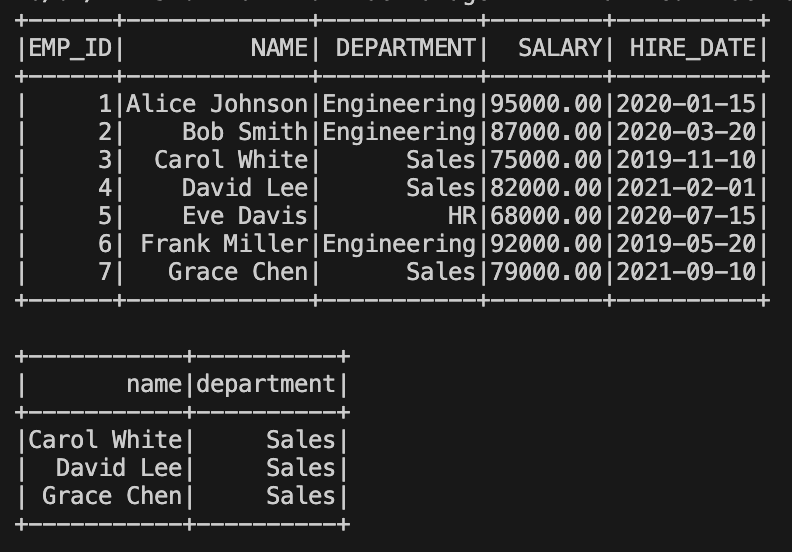
The Result: the first table shows all the employees and in the second we show we have filtered out all sales persons.

Approach 2: Using Snowpark Connect for Apache Spark
Snowpark Connect for Apache Spark represents a significant evolution in the integration between Spark and Snowflake. It allows you to run your existing Spark code (including Spark SQL, DataFrame operations) directly within Snowflake's compute engine, rather than requiring a separate, external Spark cluster.
The big question: Does it actually run Spark? No, it does not.
What it does is that it translates your Spark code into SnowSQL and can use all the optimisation features that Snowflake has to offer.
Benefits of Snowpark Connect
- Eliminates Separate Clusters: One of the biggest advantages is removing the need to provision and maintain dedicated Spark clusters, significantly reducing operational overhead and costs.
- Native Execution: Spark workloads are executed natively on Snowflake's powerful engine. This means you leverage Snowflake's performance, scalability, security, and governance features for your Spark tasks.
- Reduced Data Movement: Because you process data directly within Snowflake, No data need to be transferred between a spark cluster and Snowflake. This leads to lower costs, reduced latency, and simplified data governance.
- Familiarity: Developers can continue to use their familiar Spark APIs (PySpark DataFrames, Spark SQL) without needing to rewrite their code or learn new constructs.
- Architecture: Snowflake provides a Spark Connect-compatible server that translates Spark logical plans into Snowpark or SQL operations for execution within Snowflake.
Example: Reading Data with Snowpark Connect
Here's an example script (spark_on_snowpark.py) showcasing how to leverage Snowpark Connect with the same use case as we used above in our example spark to snowflake:
Make sure you have installed pyspark and snowpark-connect, both can be installed using pip
from snowflake import snowpark_connect
from snowflake.snowpark_connect.snowflake_session import SnowflakeSession

spark = snowpark_connect.server.init_spark_session()
sf_session = SnowflakeSession(spark)


# Read and show
df = spark.read \
   .format("net.snowflake.spark.snowflake") \
   .option("dbtable", "employees") \
   .load()

df.show()

filtered_df = df.select("name", "department").filter(df["department"] == "Sales")

filtered_df.show()

filtered_df.write \
   .format("snowflake") \
   .option("dbtable", "sales_employees") \
   .mode('overwrite') \
   .save()

print(f"Wrote {filtered_df.count()} lines to snowfalke")

# stop Snowpark server if available
if hasattr(snowpark_connect.server, "stop"):
   snowpark_connect.server.stop()
elif hasattr(snowpark_connect.server, "shutdown"):
   snowpark_connect.server.shutdown()
spark.stop()
Explanation: In this script, snowflake.snowpark_connect.server.init_spark_session() initializes a Spark session that is implicitly connected to your Snowflake environment. The SnowflakeSession(spark) object further strengthens this integration.
Notice that explicit connection options (like URL, user, warehouse, private key) are no longer needed in the sf_options dictionary, as these are managed by the Snowpark Connect configuration (which we will create in a bit). The rest of the Spark DataFrame operations remain largely the same, demonstrating the power of using familiar Spark APIs with Snowflake's native capabilities.
To get it to work we would still need specify a connection in our connections file ~/.snowflake/connections.toml. Please make sure to name the connection [spark-connect]
[snowpark-submit]
host = "<your_account>.snowflakecomputing.com"
account = "<your_account>"
user = "<your_username (email)>"
password = "<your_password>"
warehouse = "<your_warhouse>"
database = "<your_database>"
schema = "<your_schema>"
The Result: the result should be exactly the same as running it using traditional spark.
Comparison and when to use which
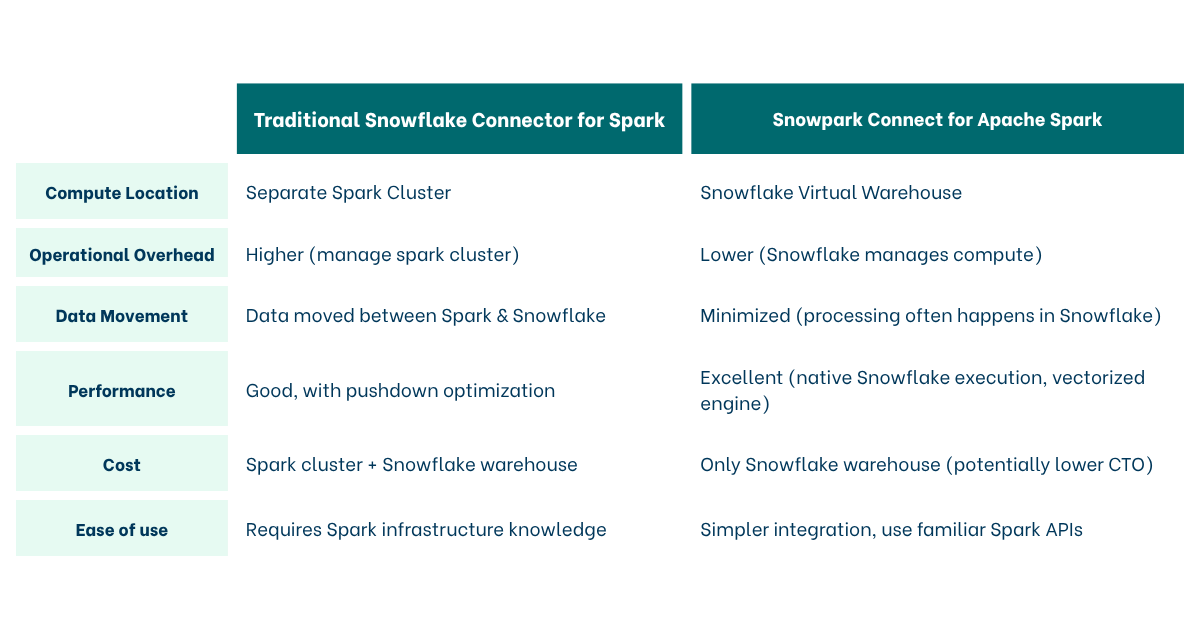
Choose the Traditional Connector when:
- You have existing, heavily customized Spark environments that are difficult to migrate.
- You need very specific Spark library versions or configurations not yet fully supported by Snowpark Connect.
- You are performing transformations that require full Spark cluster capabilities that cannot be pushed down to Snowflake.
Choose Snowpark Connect when:
- You want to simplify your architecture and reduce operational costs by consolidating compute.
- You prioritize native Snowflake performance, scalability, and security for your Spark workloads.
- You want to minimize data movement and latency.
- You are starting new Spark projects with Snowflake or modernizing existing ones.
What can’t it do?
Although we have seen how easy it is to update your code from Spark to Snowpark Connect. You still need to watch out for some of the operations with will not work “yet”:
- Low-Level RDD APIs: Snowpark Connect supports the DataFrame API and Spark SQL, but it does not support the RDD (Resilient Distributed Dataset) API.
- Spark Structured Streaming: It does not currently support Spark Structured Streaming (e.g.,
readStreamorwriteStream). If you need real-time streaming with complex stateful processing, you would still use a Spark cluster (or switch to Snowflake’s native streaming features like Dynamic Tables and Snowpipe). - Comprehensive Machine Learning (MLlib): While basic transformers may work, many parts of Spark MLlib (like certain Estimators and distributed training algorithms) are not supported
- GraphX and Graph Processing: If your workload involves graph analytics using GraphX, you cannot use Snowpark Connect. Snowflake does not have a native equivalent for Spark's graph processing library.
- Specialized Data Formats (Delta Lake / Hudi): While Snowflake is expanding its support for Open Table Formats (like Iceberg), if your pipeline relies on native Delta Lake or Hudi features
Conclusion
Both the Snowflake Connector for Apache Spark and Snowpark Connect provide valuable ways to integrate Spark with Snowflake. While the traditional connector offers robust data exchange, Snowpark Connect pushes the boundaries by allowing Spark workloads to run directly within Snowflake, unlocking significant benefits in terms of operational simplicity, performance, and cost efficiency. As Snowflake continues to innovate, Snowpark Connect emerges as the preferred choice for a truly integrated and optimized Spark-on-Snowflake experience.
Sources
- https://docs.snowflake.com/en/developer-guide/snowpark-connect/snowpark-connect-overview
- https://docs.snowflake.com/en/developer-guide/snowpark-connect/snowpark-connect-workloads-jupyter
- https://docs.snowflake.com/en/developer-guide/snowpark-connect/snowpark-connect-snowflake-sql