




Snowflake and Databricks are the two dominant cloud data platforms of the modern era — but they were built for fundamentally different jobs. Snowflake is a fully managed cloud data warehouse optimised for SQL-based analytics and business intelligence. Databricks is an open lakehouse platform designed for large-scale data engineering, machine learning, and AI workloads. Choosing between them comes down to one core question: what does your data team actually need to do?
That said, the line between the two has blurred significantly. Both platforms have spent years expanding into each other's territory — Snowflake into data science and ML, Databricks into SQL warehousing and BI. Today, many organisations use both. But for teams evaluating a primary platform, the differences still matter enormously.
Snowflake vs Databricks: What's the difference?
Snowflake: The Cloud Data Warehouse
Snowflake is a cloud-native data platform built from the ground up to run entirely in the cloud — not ported from an on-premises system. Launched in 2012 and going public in 2020, Snowflake was designed with one core insight: separate storage from compute, and manage everything as a fully-hosted service so data teams can focus on analysis rather than infrastructure.
Snowflake excels at storing and querying structured and semi-structured data at scale. Its architecture lets multiple virtual warehouses query the same data simultaneously without contention, making it particularly strong for concurrent BI workloads and data sharing across teams, departments, or even external partners via its Marketplace. For a deeper look at how the platform is built, see our Introduction to Snowflake's Cloud Data Warehouse.
Databricks: The Data Lakehouse Platform
Databricks was founded in 2013 by the creators of Apache Spark — the open-source distributed computing framework originally developed at UC Berkeley. Its original product was a managed Spark service with a collaborative notebook interface. Over time, Databricks evolved into what it calls the "data lakehouse": a platform that merges the flexibility of a data lake with the governance and query performance of a data warehouse.
Databricks is the platform of choice for teams running complex data engineering pipelines, training machine learning models, or processing massive volumes of raw and unstructured data. It supports Python, R, Scala, and SQL, and manages the full ML lifecycle through its open-source MLflow framework.
Architecture: Data Warehouse vs. Data Lakehouse
The architectural difference between Snowflake and Databricks is the root of nearly every practical difference between them.
Snowflake uses a three-layer architecture: a cloud storage layer (managed by Snowflake), a compute layer of independent virtual warehouses, and a cloud services layer that handles query optimisation, metadata, and access control. Users never touch the underlying infrastructure. Data is stored in Snowflake's internal columnar format, automatically compressed and micro-partitioned for fast retrieval. The result is a platform that is fast to set up, easy to maintain, and optimised for analytical SQL queries out of the box.
Databricks is built on top of open cloud storage (AWS S3, Azure Blob, Google Cloud Storage) using Delta Lake — an open-source storage layer that adds ACID transactions, schema enforcement, and versioning to standard data lake files. Compute is delivered via Apache Spark clusters, which users configure and manage. This gives Databricks far more flexibility — users can run batch jobs, streaming pipelines, notebook-based data science, and ML training all on the same platform — but it also introduces more operational complexity compared to Snowflake's managed model.
Key Differences at a Glance
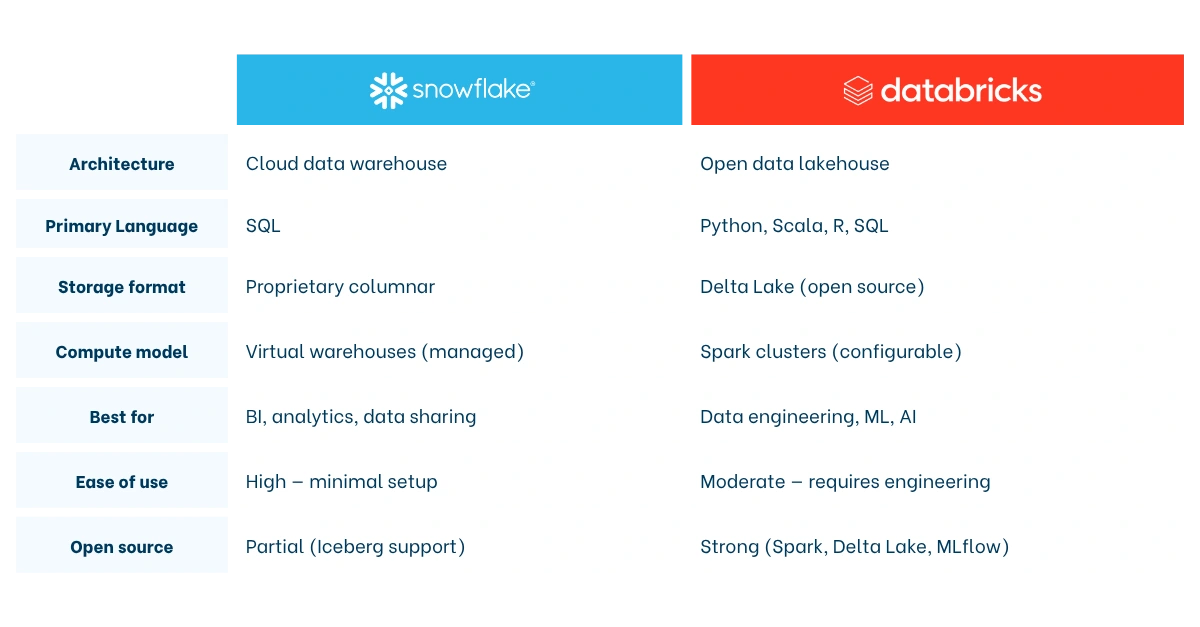
Ease of use: Snowflake wins this category clearly. Its SQL-native interface, auto-scaling warehouses, and zero-administration model make it accessible to data analysts who know SQL but have no interest in managing clusters. Databricks is more powerful but rewards teams with dedicated data engineers and ML practitioners.
Language support: Snowflake is SQL-first. It has added Python support through Snowpark, but SQL remains the primary interface. Databricks supports Python, Scala, R, and SQL natively — giving data scientists and engineers far more flexibility in how they build pipelines and models.
Machine learning and AI: Databricks has a structural advantage here. MLflow (which Databricks created) provides end-to-end ML lifecycle management: experiment tracking, model packaging, and deployment. Databricks also offers built-in vector search for retrieval-augmented generation (RAG) and supports model serving at scale. Snowflake has invested heavily in its Cortex AI suite — including Cortex Analyst, which lets business users query data in natural language — but for teams building and training custom ML models, Databricks remains the stronger environment.
Governance and security: Both platforms offer robust role-based access control, encryption, and compliance tooling. Snowflake provides governance out of the box with its Horizon Catalog, a 99.9% uptime SLA, and built-in cross-region disaster recovery. Databricks manages governance through Unity Catalog, which is powerful but requires more configuration to reach enterprise-grade standards.
Openness: Databricks is rooted in open source — Apache Spark, Delta Lake, and MLflow are all major open-source projects with broad industry adoption. Snowflake has embraced Apache Iceberg as an open table format and supports open APIs through its Horizon Catalog, but its core storage format remains proprietary. Teams concerned about vendor lock-in tend to favour Databricks on this dimension.
Performance and cost: what does the data say?
Performance comparisons between Snowflake and Databricks depend heavily on the workload type.
For analytical SQL queries — the kind that power dashboards and BI reports — Snowflake's fully managed, serverless engine is highly competitive. Snowflake claims its results run approximately twice as fast as Databricks for core analytics in third-party testing, powered by automatic query optimisation and micro-partitioning that requires no manual tuning. Multiple virtual warehouses can run simultaneously without competing for resources, which makes Snowflake particularly strong for organisations with high query concurrency.
For big data processing and ML workloads, Databricks has the edge. Its Apache Spark engine, combined with the Photon vectorised query engine, is built for distributed processing at scale. Databricks also supports streaming data natively, which Snowflake handles less naturally given its warehouse-first orientation.
On cost, the picture is nuanced. Snowflake charges per credit based on virtual warehouse size and usage time, with auto-suspend features that pause compute when it's idle — making it cost-efficient for workloads with variable demand. Databricks prices on Databricks Units (DBUs), and cost unpredictability is a commonly cited concern: clusters left running can generate significant bills. Several organisations have reported savings of 50–70% on infrastructure costs after migrating away from Databricks to a more managed platform, though Databricks counters that its total cost of ownership is lower for teams with complex, high-volume engineering workloads where its Spark engine outperforms alternatives.
The honest answer: neither platform is universally cheaper. Cost efficiency depends on your workload patterns, team size, and how well you manage compute resources.
Which platform is right for your team?
There is no universal answer. The right choice depends on your data strategy, team composition, and primary use cases.
Choose Snowflake if…
- Your team is primarily made up of SQL analysts and BI developers who need fast, reliable query performance without managing infrastructure.
- You need a plug-and-play analytics solution that delivers value quickly — Snowflake's setup time is measured in hours, not weeks.
- Data sharing is a core requirement: with external partners, subsidiaries, or data marketplace consumers.
- You want strong out-of-the-box governance, disaster recovery, and enterprise SLAs with minimal configuration.
- Your primary workloads are structured data analytics, dashboarding, and reporting.
Choose Databricks if…
- Your team includes data engineers, ML engineers, or data scientists who write Python, Scala, or Spark code and need a flexible, programmable environment.
- You are running machine learning or AI model development at scale — training, tracking, and deploying custom models.
- You work with large volumes of raw, unstructured, or streaming data that needs transformation before it can be analysed.
- Avoiding vendor lock-in is a strategic priority: Delta Lake, Spark, and MLflow are open standards with broad ecosystem support.
- Your architecture demands a unified platform for data engineering, analytics, and AI — what Databricks calls the lakehouse.
Can you use both together?
Yes — and many organisations do. A common pattern is using Databricks for upstream data engineering and ML, and Snowflake as the serving layer for BI and analytics. The two platforms integrate well, and as open table formats like Apache Iceberg gain adoption, interoperability between them is improving.
That said, running two platforms adds cost and operational overhead. Most teams benefit from committing to a primary platform and supplementing with the other only where the use case genuinely demands it.
Snowflake vs Databricks in the modern data stack
Neither Snowflake nor Databricks operates in isolation. Both sit inside a broader modern data stack alongside tools for ingestion, transformation, and visualisation — and your choice of platform will shape how that stack is assembled.
A typical Snowflake-based modern data stack looks like this: data is ingested via a connector tool like Fivetran, transformed inside Snowflake using dbt, and visualised through a BI tool like Tableau or ThoughtSpot. This stack is well-suited to analytics teams that want fast time-to-insight with minimal engineering overhead. It is the stack that Biztory has implemented for dozens of clients across industries. For more on how this architecture fits together, read our guide to What is the Modern Data Stack?
A typical Databricks-based stack leans heavier on engineering: data lands in a cloud data lake (S3 or Azure Data Lake), Databricks processes and transforms it using Spark pipelines, Delta Lake stores the results, and ML models are served via MLflow. BI tools can then query the Delta tables directly or via Databricks SQL.
Snowflake is also evolving rapidly beyond its warehouse roots. As we explored in the past, Snowflake is increasingly functioning as a full data operating system — embedding AI capabilities, native app development, and governance tooling that collapse several stack layers into one. That evolution makes the Snowflake vs Databricks comparison more interesting every year, not less.
Frequently Asked Questions
What is the main difference between Snowflake and Databricks?
Snowflake is a fully managed cloud data warehouse optimised for SQL-based analytics, business intelligence, and data sharing. Databricks is an open data lakehouse platform built for large-scale data engineering, machine learning, and AI. Snowflake prioritises ease of use and out-of-the-box performance for analysts; Databricks prioritises flexibility and power for engineering and data science teams. Both platforms have expanded into each other's territory, but these core orientations still define where each excels.
Is Snowflake or Databricks better for machine learning?
Databricks is the stronger choice for machine learning. It was built by the creators of Apache Spark and MLflow, and provides an end-to-end ML environment: data preparation, model training, experiment tracking, and deployment — all on the same platform. Snowflake has invested in AI capabilities through its Cortex suite, which is well-suited to embedding AI into analytics workflows. But for teams building and training custom ML models, Databricks offers meaningfully deeper tooling.
Which is cheaper, Snowflake or Databricks?
It depends on the workload. Snowflake's auto-suspending virtual warehouses make it cost-efficient for variable analytical query loads, and its managed model eliminates the engineering overhead of cluster management. Databricks can be more cost-effective for high-volume data engineering and ML workloads where its Spark engine performs efficiently at scale — but cluster cost unpredictability is a real risk without proper governance. Neither platform is universally cheaper; total cost of ownership depends heavily on usage patterns and team discipline around compute management.
Can Snowflake and Databricks be used together?
Yes. Many organisations run both — using Databricks for upstream data engineering and ML, and Snowflake as the analytics and BI serving layer. The platforms integrate well, and open formats like Apache Iceberg are improving interoperability. However, running both adds cost and complexity. Most teams benefit from choosing a primary platform based on their dominant use case and supplementing with the other only where the workload genuinely demands it.